> For the complete documentation index, see [llms.txt](https://resources.atriptech.com/llms.txt). Markdown versions of documentation pages are available by appending `.md` to page URLs; this page is available as [Markdown](https://resources.atriptech.com/api-wen-dang/readme-1/making-requests.md).
# 沙箱访问
Atlas API 沙箱访问指南:凭证、请求头、gzip 处理以及在开发前的首次认证请求。
{% hint style="info" %}
💬 **需要帮助?** 如果遇到问题,请在帮助中心咨询 Eva,快速获取诊断建议。
咨询 Eva
{% endhint %}
使用此页面获取沙箱访问权限并准备您的首次 API 调用。
{% hint style="info" %}
获取沙箱凭证后,运行 [沙箱验证测试工具包](/api-wen-dang/readme-1/sandbox-development/sandbox-validation-test-kit.md)。
用它来在开发开始前确认凭证、网络访问以及无代码预订的快乐路径。
{% endhint %}
当您需要以下内容时,从这里开始:
* 生成沙箱凭证
* 确认所需的请求头和请求格式
* 准备首次经过身份验证的 Atlas API 调用
### 常见问题
#### 在哪里获取 Atlas API 沙箱凭证?
在 ATRIP 中的 `Profile` → `My Profile` → `Company Information` 下生成它们。在每个沙箱请求中使用 `x-atlas-client-id` 和 `x-atlas-client-secret`。
#### 沙箱开发开始前应准备好什么?
确保凭证可用、标准请求头已配置、`Accept: */*` 已发送、gzip 响应已处理,并且团队了解哪些标识符将在后续的预订流程中重复使用。
#### 为什么必须发送 `Accept: */*`?
Atlas 可按响应 `Content-Type` 返回任意内容类型。`Accept: */*` 允许客户端接收这些响应,并确保 gzip 传输正常。
不要发送 `Accept: application/json`。该设置可能限制客户端可接受的内容类型。
#### 未发送 `Accept: */*` 时会出现什么错误?
接口可能返回以下错误:
> We require that your application accept any type of content returned by the server (specified by the response header Content-Type) for better network transmission efficiency and future extensibility. Therefore, we recommend that you include */* in the Accept field of the HTTP request header (e.g.: Accept: */*). Note: For transmission efficiency reasons, application/json is currently not recommended in the Accept header.
此错误表示请求未使用 `Accept: */*`,或使用了 `Accept: application/json`。将请求头改为 `Accept: */*` 后重试。
### 本阶段的目标
完成沙箱的初始访问设置。您应在构建预订流程之前完成此阶段。
### 生成沙箱凭证
在 ATRIP 中获取您的沙箱凭证:
1. 打开 `Profile`。
2. 打开 `My Profile`。
3. 打开 `Company Information`。
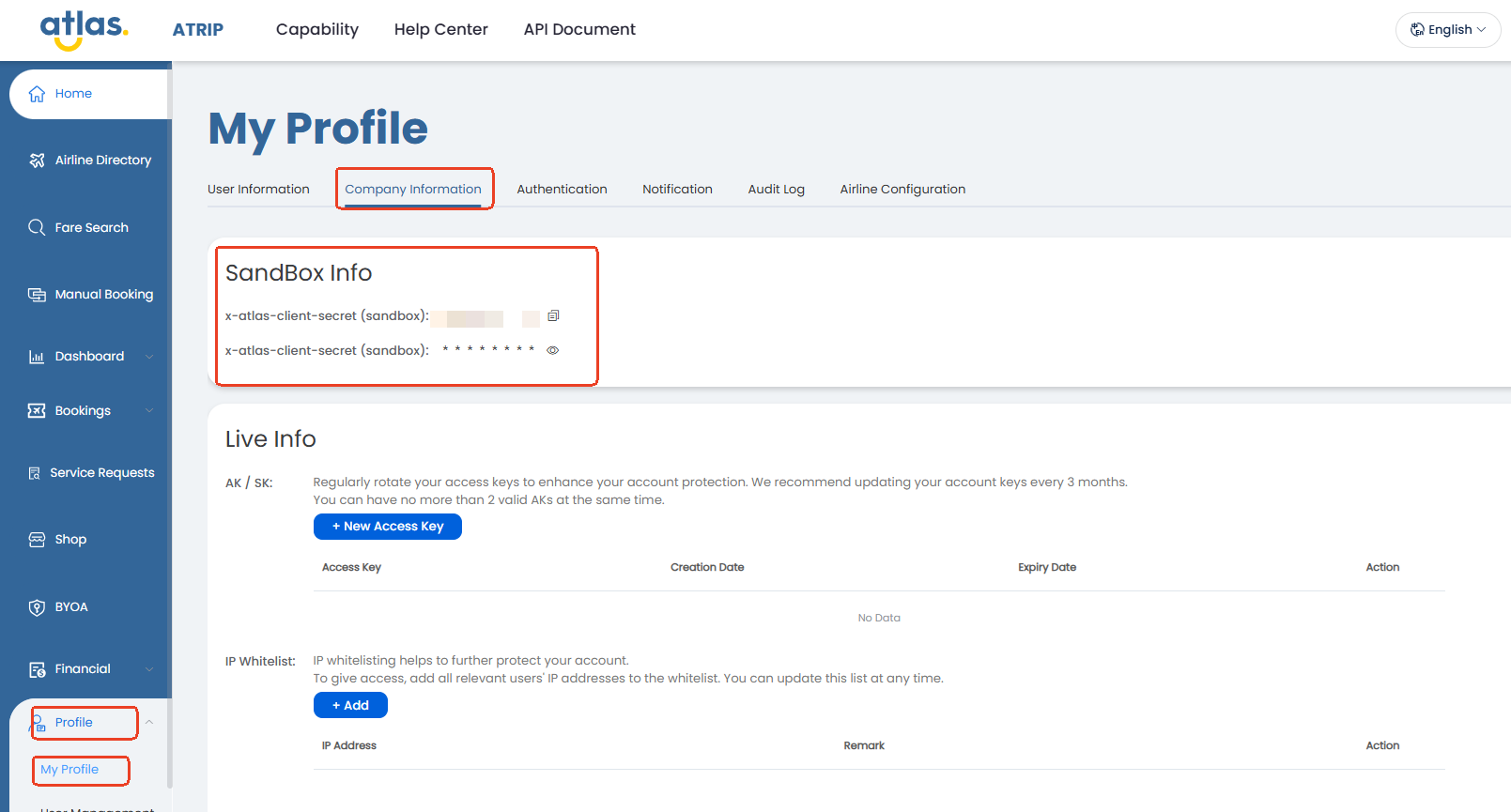 在 `Sandbox Info` 中,您可以找到:
* `x-atlas-client-id`
* `x-atlas-client-secret`
在每个沙箱 API 调用中使用这些值。
### 沙箱基础 URL
沙箱 API 调用使用此基础 URL:`https://sandbox.atriptech.com/`。将其与每个请求的端点路径结合使用。
{% hint style="warning" %}
此基础 URL 仅用于沙箱。
生产环境使用不同的基础 URL,在 ATRIP 的 `My Profile` → `Company Information` 中显示。
生产环境为 `搜索` 使用一个基础 URL,为所有其他交易 API 使用另一个基础 URL。
{% endhint %}
### 标准请求头
默认发送以下请求头:
* `Content-Type: application/json`
* `Accept: */*`
* `Accept-Encoding: gzip`
* `x-atlas-client-id: `
* `x-atlas-client-secret: `
{% hint style="warning" %}
每个请求都必须发送 `Accept: */*`。
不要将 `Accept` 设置为 `application/json`。该设置可能导致 gzip 传输异常,并使接口返回错误。
{% endhint %}
#### `Accept` 配置示例
```http
Content-Type: application/json
Accept: */*
Accept-Encoding: gzip
```
### 最佳实践
仅在服务端保留凭证。
在构建预订流程之前验证 `Accept: */*`、gzip 处理和成功状态规则。
### 请求基础
使用以下请求默认值:
```
POST /.do
```
* 对 Atlas API 调用使用 `POST`。
* 每次调用发送 JSON 请求体。
### 后续使用的标识符
您将在后续步骤中捕获这些标识符。在预订流程中重复使用它们:
* `routingIdentifier`
* `sessionId`
* `orderNo`
### 响应与压缩基础
Atlas 可能返回任何由 `Content-Type` 指定的内容类型。请求必须包含 `Accept: */*`,以接受服务器返回的内容。
如果您发送 `Accept-Encoding: gzip`,请正确处理 gzip 响应。大多数 HTTP 客户端会自动解压 gzip。
在每次集成中使用以下规则:
* 每个请求发送 `Accept: */*`。
* 不要发送 `Accept: application/json`。
* 将 `status == 0` 视为成功。
* 不要使用 `msg` 进行业务逻辑判断。
* 在进入下一步之前检查返回的标识符。
* 当返回 `Content-Encoding: gzip` 时处理压缩响应。
### 安全基础
在服务端保留两个凭证值。不要将它们暴露在客户端应用程序中。使用沙箱进行集成和测试。仅在验证完成后使用生产环境。
### 完成此阶段的标准
您可以在沙箱中完成以下所有操作:
* 成功发送经过身份验证的请求
* 正确使用标准请求头
* 知道哪些标识符将在后续重复使用
* 正确处理 gzip 响应
### 本阶段的产出
* 沙箱客户端 ID 和客户端密钥
* 可用的请求配置
* 准备就绪的沙箱环境
### 下一步
继续 [沙箱开发](/api-wen-dang/readme-1/sandbox-development.md)。
### 相关页面
* [快速入门](/api-wen-dang/readme-1/quick-start.md)
* [沙箱验证测试工具包](/api-wen-dang/readme-1/sandbox-development/sandbox-validation-test-kit.md)
* [沙箱开发](/api-wen-dang/readme-1/sandbox-development.md)
* [预订概述](/api-wen-dang/product-guides/booking/booking-overview.md)
在 `Sandbox Info` 中,您可以找到:
* `x-atlas-client-id`
* `x-atlas-client-secret`
在每个沙箱 API 调用中使用这些值。
### 沙箱基础 URL
沙箱 API 调用使用此基础 URL:`https://sandbox.atriptech.com/`。将其与每个请求的端点路径结合使用。
{% hint style="warning" %}
此基础 URL 仅用于沙箱。
生产环境使用不同的基础 URL,在 ATRIP 的 `My Profile` → `Company Information` 中显示。
生产环境为 `搜索` 使用一个基础 URL,为所有其他交易 API 使用另一个基础 URL。
{% endhint %}
### 标准请求头
默认发送以下请求头:
* `Content-Type: application/json`
* `Accept: */*`
* `Accept-Encoding: gzip`
* `x-atlas-client-id: `
* `x-atlas-client-secret: `
{% hint style="warning" %}
每个请求都必须发送 `Accept: */*`。
不要将 `Accept` 设置为 `application/json`。该设置可能导致 gzip 传输异常,并使接口返回错误。
{% endhint %}
#### `Accept` 配置示例
```http
Content-Type: application/json
Accept: */*
Accept-Encoding: gzip
```
### 最佳实践
仅在服务端保留凭证。
在构建预订流程之前验证 `Accept: */*`、gzip 处理和成功状态规则。
### 请求基础
使用以下请求默认值:
```
POST /.do
```
* 对 Atlas API 调用使用 `POST`。
* 每次调用发送 JSON 请求体。
### 后续使用的标识符
您将在后续步骤中捕获这些标识符。在预订流程中重复使用它们:
* `routingIdentifier`
* `sessionId`
* `orderNo`
### 响应与压缩基础
Atlas 可能返回任何由 `Content-Type` 指定的内容类型。请求必须包含 `Accept: */*`,以接受服务器返回的内容。
如果您发送 `Accept-Encoding: gzip`,请正确处理 gzip 响应。大多数 HTTP 客户端会自动解压 gzip。
在每次集成中使用以下规则:
* 每个请求发送 `Accept: */*`。
* 不要发送 `Accept: application/json`。
* 将 `status == 0` 视为成功。
* 不要使用 `msg` 进行业务逻辑判断。
* 在进入下一步之前检查返回的标识符。
* 当返回 `Content-Encoding: gzip` 时处理压缩响应。
### 安全基础
在服务端保留两个凭证值。不要将它们暴露在客户端应用程序中。使用沙箱进行集成和测试。仅在验证完成后使用生产环境。
### 完成此阶段的标准
您可以在沙箱中完成以下所有操作:
* 成功发送经过身份验证的请求
* 正确使用标准请求头
* 知道哪些标识符将在后续重复使用
* 正确处理 gzip 响应
### 本阶段的产出
* 沙箱客户端 ID 和客户端密钥
* 可用的请求配置
* 准备就绪的沙箱环境
### 下一步
继续 [沙箱开发](/api-wen-dang/readme-1/sandbox-development.md)。
### 相关页面
* [快速入门](/api-wen-dang/readme-1/quick-start.md)
* [沙箱验证测试工具包](/api-wen-dang/readme-1/sandbox-development/sandbox-validation-test-kit.md)
* [沙箱开发](/api-wen-dang/readme-1/sandbox-development.md)
* [预订概述](/api-wen-dang/product-guides/booking/booking-overview.md)