> For the complete documentation index, see [llms.txt](https://resources.atriptech.com/llms.txt). Markdown versions of documentation pages are available by appending `.md` to page URLs; this page is available as [Markdown](https://resources.atriptech.com/api-document/readme-1/production-go-live.md).
# Production Go-Live
Atlas API production go-live guide for LIVE status, production credentials, endpoint switch, smoke testing, and first-live monitoring.
{% hint style="info" %}
💬 **Need help?** If you're stuck, ask Eva in the Help Center for instant diagnostics.
Ask Eva
{% endhint %}
Use this page when you are ready to move from sandbox to production.
Start here when you need to:
* switch from sandbox to production safely
* understand what changes at go-live
* monitor the first live orders and webhook events
### FAQ
#### When can we generate production credentials?
Only after UAT passes and your customer manager switches the account to `LIVE`.
UAT approval alone does not unlock production credentials.
#### What should we monitor right after go-live?
Monitor first live orders, payment results, ticketing follow-up, and webhook delivery closely.
Use a controlled smoke test before normal production traffic ramps up.
### Goal of this phase
Move the integration from sandbox to production.
This is the final step in the overall onboarding flow.
### Do not start go-live yet if
Wait before switching environments when any of these are still open:
* UAT is not approved
* the account is not switched to `LIVE`
* production credentials are not generated yet
* the team is not ready to monitor first live traffic
### When to start
Start this step after:
* the required UAT work is complete
* your booking flow is stable
* webhook handling is ready
* your team can monitor the first live orders
Do not start production setup before your go-live checklist is ready.
You can generate production credentials only after UAT passes and your customer manager switches your account to `LIVE` status.
### What should be ready before go-live?
Make sure UAT is approved, the booking flow is stable, webhook handling is ready, and the team can monitor live transactions from the first order.
### What changes in production
Move these items from sandbox to production:
* credentials
* endpoints
* payment handling
* operational monitoring
Header rules stay the same.
Live bookings and payments are real transactions.
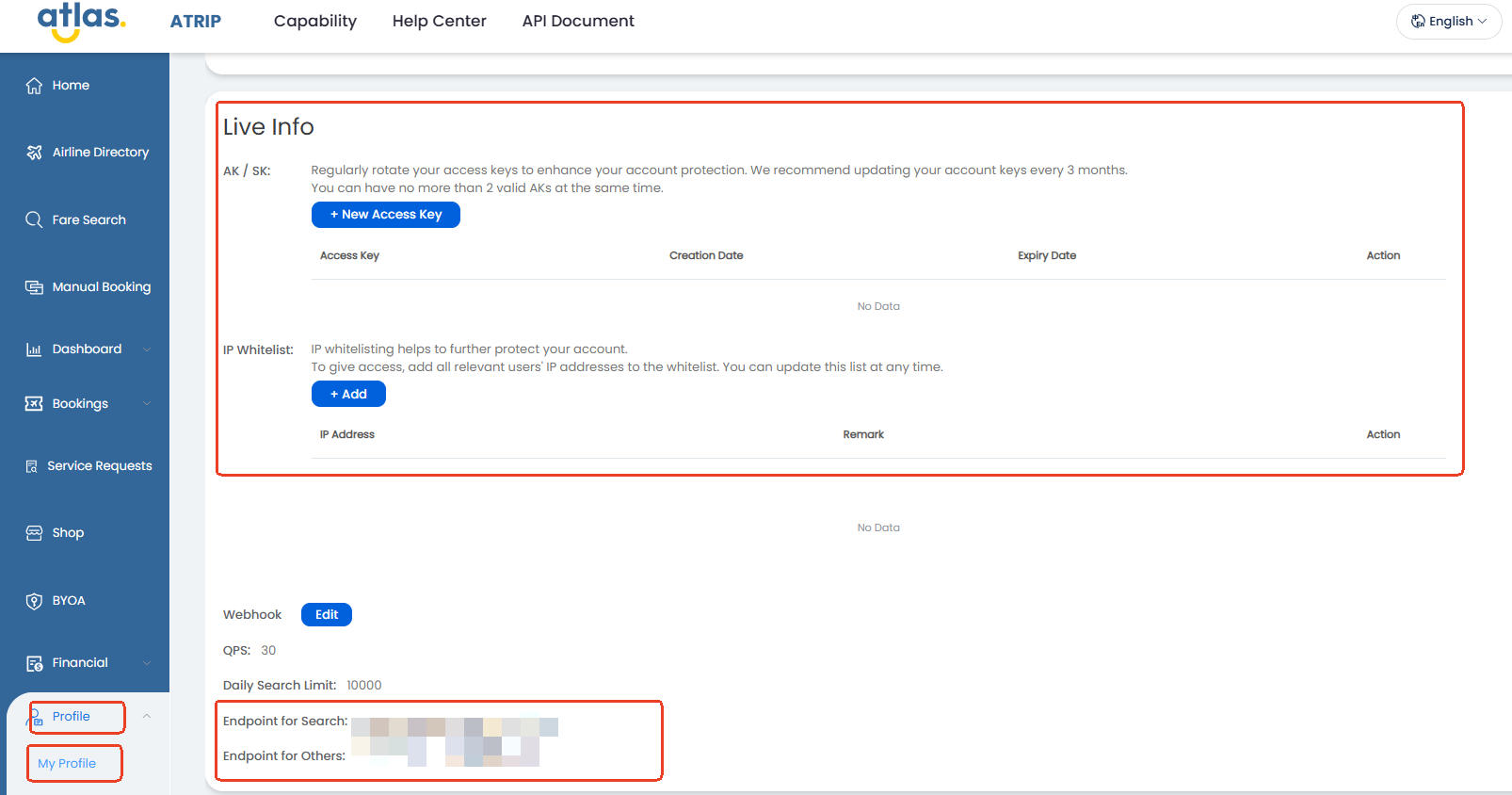
In production, get the live API base URLs in ATRIP under `My Profile` → `Company Information`.
Do not reuse the sandbox base URL after go-live.
Production uses one base URL for `search` and another for all other transaction APIs.
### Best practice
Switch credentials and endpoints in a controlled release.
Validate the first live flow end to end before scaling traffic.
### What to check during the first smoke test
Confirm these items on the first live run:
* authentication succeeds with production credentials
* the correct production base URL is used for each API group
* payment completes with the intended production method
* order follow-up and webhook delivery work as expected
### Go-live checklist
{% stepper %}
{% step %}
### Confirm UAT completion
Make sure the required UAT work is complete and any remaining issues are closed.
{% endstep %}
{% step %}
### Wait for LIVE status
After UAT passes, your customer manager changes your account status to `LIVE`.
You cannot generate production credentials before this status update is complete.
{% endstep %}
{% step %}
### Generate production credentials
After your account is in `LIVE` status, generate the production client ID and client secret in ATRIP.
Set up your IP whitelist in the same production setup flow.
Production credential generation and IP whitelist setup in ATRIP
Customers can generate these values directly only after the account is set to `LIVE`.
{% endstep %}
{% step %}
### Switch your environment
Replace sandbox credentials and sandbox endpoints in your server configuration.
Get the live API base URLs from ATRIP under `My Profile` → `Company Information`.
Use the production `search` base URL for search traffic.
Use the other production base URL for all remaining transaction APIs.
{% endstep %}
{% step %}
### Run a controlled smoke test
Verify the first live API calls, webhook delivery, and ticketing follow-up.
{% endstep %}
{% step %}
### Monitor the first live orders
Track order status, payment results, and webhook events closely after launch.
{% endstep %}
{% endstepper %}
### Complete this phase when
You have all of these in production:
* working production credentials
* account status updated to `LIVE`
* correct production endpoints
* successful smoke test results
* monitored first live orders and webhooks
### Output of this phase
* production-ready environment
* live booking capability
* initial post-launch validation completed
### Important notes
* Do not use sandbox cards in production.
* Do not use sandbox fares for production checks.
* Keep production credentials server-side.
* Confirm that your production IP whitelist stays up to date.
* UAT completion alone does not unlock production credentials. Your customer manager must switch the account to `LIVE`.
### If the first live run fails
Use this recovery order:
1. Confirm the account status is `LIVE`.
2. Confirm the production client ID and client secret are correct.
3. Confirm the correct production base URL is used for `search` and for the remaining transaction APIs.
4. Confirm the production IP whitelist includes the active source IPs.
5. Retry only after the failing configuration is corrected.
### What comes next?
After the first live smoke test succeeds, keep monitoring early production traffic until order status, payment handling, and webhook behavior are stable.
### Next step
After launch, keep monitoring early live traffic and route any booking or payment issues to the relevant troubleshooting pages quickly.
### Related pages
* [Quick Start](/api-document/readme-1/quick-start.md)
* [UAT Validation](/api-document/readme-1/uat-submission-guide.md)
* [Webhook Overview](/api-document/product-guides/extensions-and-integrations/webhook-overview.md)