> For the complete documentation index, see [llms.txt](https://resources.atriptech.com/llms.txt). Markdown versions of documentation pages are available by appending `.md` to page URLs; this page is available as [Markdown](https://resources.atriptech.com/api-document/readme-1/making-requests.md).
# Sandbox Access
Atlas API sandbox access guide for credentials, headers, gzip handling, and first authenticated requests before development.
{% hint style="info" %}
💬 **Need help?** If you're stuck, ask Eva in the Help Center for instant diagnostics.
Ask Eva
{% endhint %}
Use this page to get sandbox access and prepare your first API calls.
{% hint style="info" %}
After you get sandbox credentials, run the [Sandbox Validation Test Kit](/api-document/readme-1/sandbox-development/sandbox-validation-test-kit.md).
Use it to confirm credentials, network access, and the no-code booking happy path before development starts.
{% endhint %}
Start here when you need to:
* generate sandbox credentials
* confirm the required headers and request format
* prepare the first authenticated Atlas API calls
### FAQ
#### Where do we get Atlas API sandbox credentials?
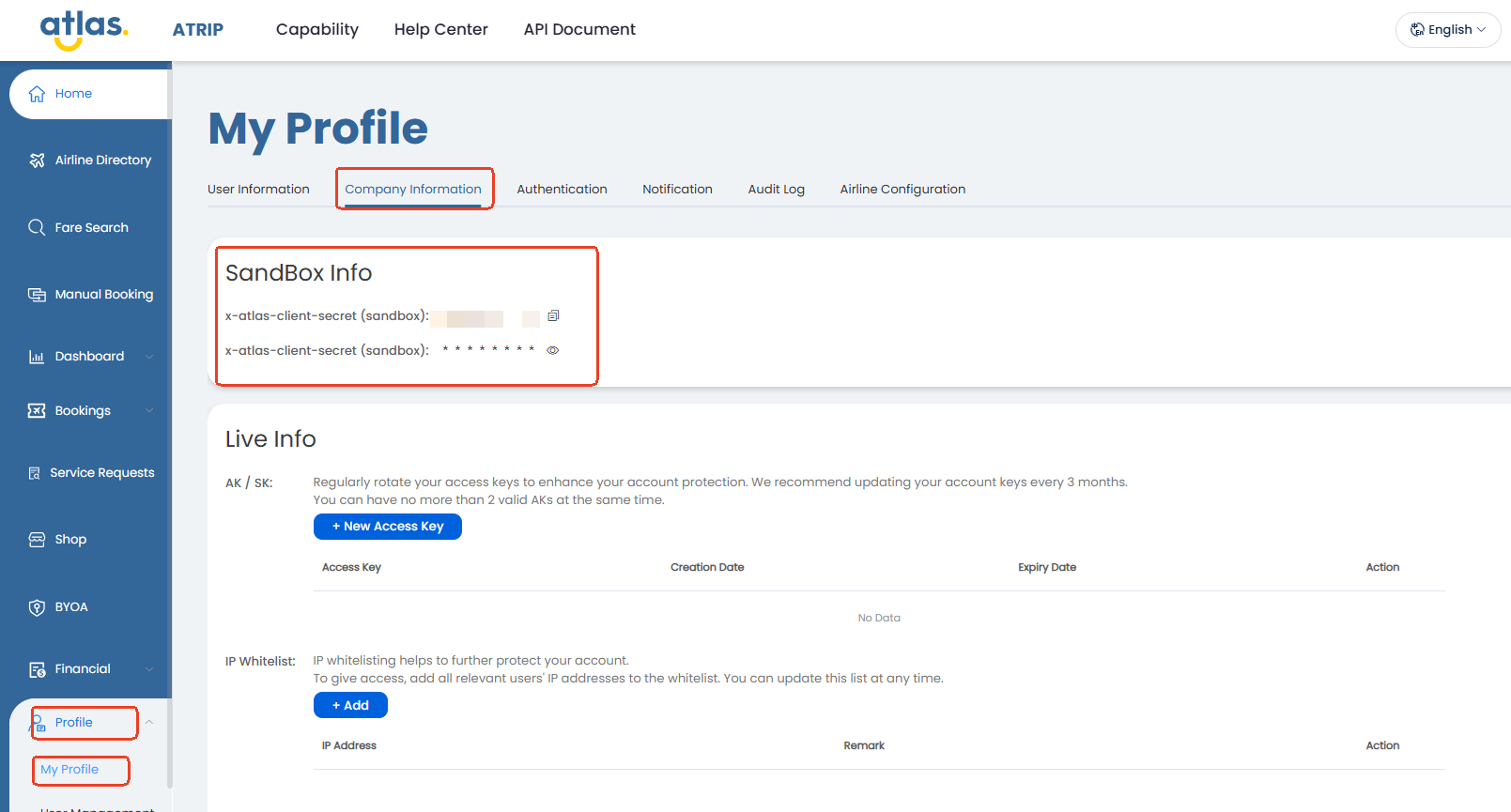
Generate them in ATRIP under `Profile` → `My Profile` → `Company Information`.
Use `x-atlas-client-id` and `x-atlas-client-secret` on every sandbox request.
#### What should be ready before sandbox development starts?
Make sure credentials work, standard headers are configured, gzip responses are handled, and the team understands which identifiers are reused later in the booking flow.
#### Which `Accept` header should we send?
Send `Accept: */*` on every Atlas API request.
Do not send `Accept: application/json`.
The wildcard supports gzip response handling and future response content types.
### Goal of this phase
Complete the initial access setup for sandbox.
You should finish this phase before building the booking flow.
### Generate sandbox credentials
Get your sandbox credentials in ATRIP:
1. Open `Profile`.
2. Open `My Profile`.
3. Open `Company Information`.
In `Sandbox Info`, you can find:
* `x-atlas-client-id`
* `x-atlas-client-secret`
Use these values on every sandbox API call.
### Sandbox base URL
Use this base URL for sandbox API calls:
`https://sandbox.atriptech.com/`
Combine it with the endpoint path for each request.
{% hint style="warning" %}
This base URL is for sandbox only.
Production uses different base URLs shown in ATRIP under `My Profile` → `Company Information`.
Production uses one base URL for `search` and another for all other transaction APIs.
{% endhint %}
### Standard headers
Send these headers by default:
* `Content-Type: application/json`
* `Accept: */*`
* `Accept-Encoding: gzip`
* `x-atlas-client-id: `
* `x-atlas-client-secret: `
#### Accept header requirement
Send `Accept: */*` on every Atlas API request.
Atlas may return different response content types.
Do not send `Accept: application/json`.
This supports efficient transmission and gzip response handling.
{% hint style="warning" %}
If `Accept: */*` is missing or uses an unsupported value, Atlas returns this error:
> We require that your application accept any type of content returned by the server (specified by the response header Content-Type) for better network transmission efficiency and future extensibility. Therefore, we recommend that you include `*/*` in the Accept field of the HTTP request header (for example: `Accept: */*`). Note: For transmission efficiency reasons, `application/json` is currently not recommended in the Accept header.
> {% endhint %}
### Best practice
Keep credentials server-side only.
Validate gzip handling and success status rules before building the booking flow.
### Request basics
Use these request defaults:
```
POST /.do
```
* Use `POST` for Atlas API calls.
* Send a JSON body on every call.
### Identifiers used later
You will capture these identifiers in later steps.
Reuse them across the booking flow:
* `routingIdentifier`
* `sessionId`
* `orderNo`
### Response and compression basics
Atlas responses can be large.
If you send `Accept-Encoding: gzip`, handle gzip responses correctly.
Most HTTP clients decompress gzip automatically.
Use these rules in every integration:
* Treat `status == 0` as success.
* Do not use `msg` for business logic.
* Check returned identifiers before moving to the next step.
* Handle compressed responses when `Content-Encoding: gzip` is returned.
### Security basics
Keep both credential values server-side.
Do not expose them in client apps.
Use sandbox for integration and testing.
Use production only after validation is complete.
### Complete this phase when
You can do all of these in sandbox:
* send authenticated requests successfully
* use the standard headers correctly
* know which identifiers are reused later
* handle gzip responses correctly
### Output of this phase
* sandbox client ID and client secret
* working request configuration
* ready-to-start sandbox environment
### Next step
Continue with [Sandbox Development](/api-document/readme-1/sandbox-development.md).
### Related pages
* [Quick Start](/api-document/readme-1/quick-start.md)
* [Sandbox Validation Test Kit](/api-document/readme-1/sandbox-development/sandbox-validation-test-kit.md)
* [Sandbox Development](/api-document/readme-1/sandbox-development.md)
* [Booking Overview](/api-document/product-guides/booking/booking-overview.md)