> For the complete documentation index, see [llms.txt](https://resources.atriptech.com/llms.txt). Markdown versions of documentation pages are available by appending `.md` to page URLs; this page is available as [Markdown](https://resources.atriptech.com/api-document/product-guides/booking/booking-overview.md).
# Booking Overview
Atlas API booking path overview for search, getOffers, verify, order creation, payment, ticketing, identifiers, and order follow-up.
{% hint style="info" %}
💬 **Need help?** If you're stuck, ask Eva in the Help Center for instant diagnostics.
Ask Eva
{% endhint %}
Use this section to choose the correct Atlas API booking path and keep the right identifier at each step.
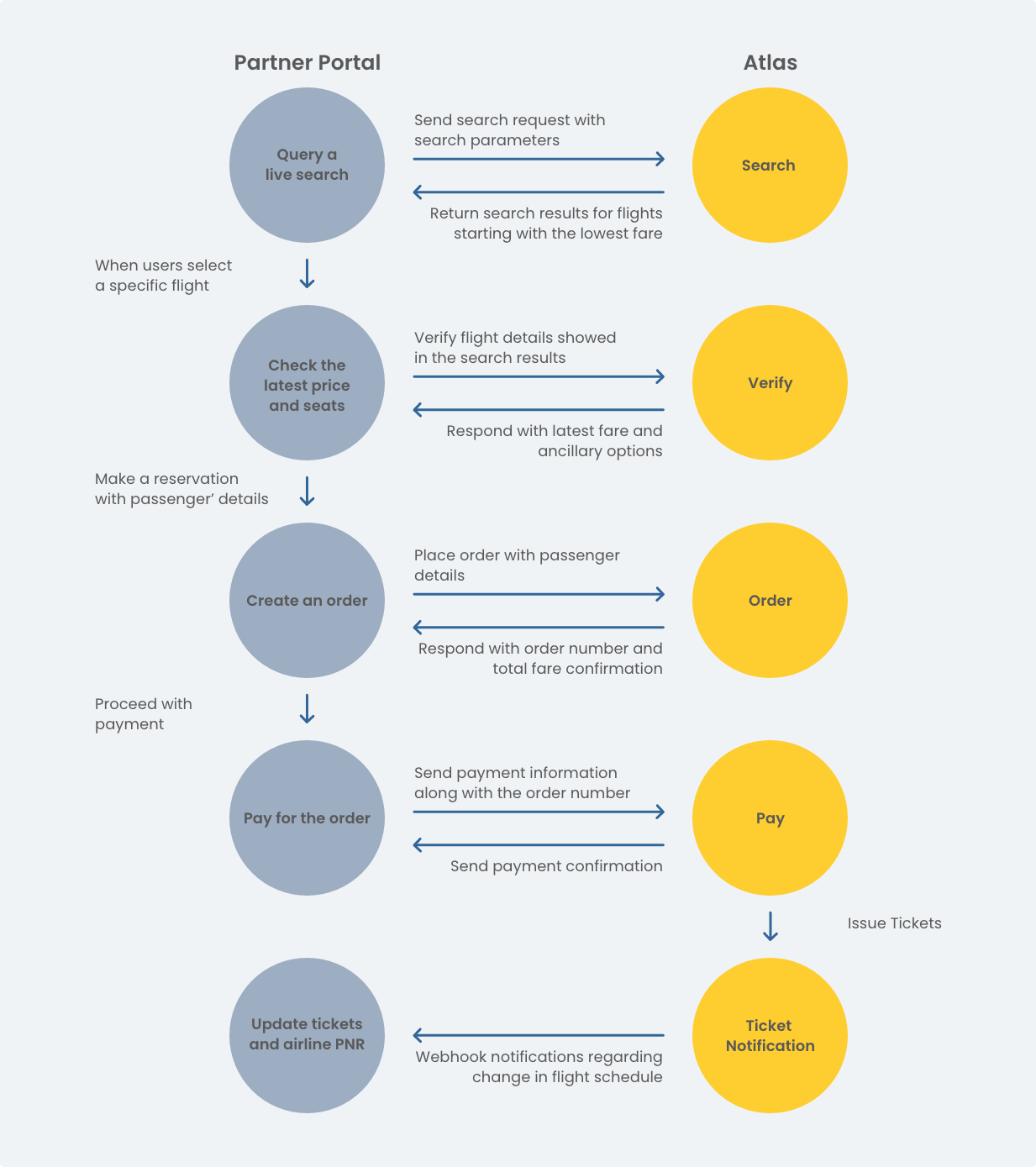
Booking path from search to payment and follow-up
Start here when you need to:
* understand the standard Atlas API booking path
* choose between `search.do` and `getOffers.do`
* see which identifier to keep at each step
* evaluate route coverage and raw prices in pre-sale
### FAQ
#### Which identifier should I keep after each step?
Keep `routingIdentifier` after `search.do`.
Keep `sessionId` after `verify.do`.
Keep `orderNo` after `order.do`.
Keep airline PNR and `ticketNos` after ticketing.
For the Get Offer path, keep `OfferId` from `getOffers.do`.
#### How long are `routingIdentifier` and `sessionId` valid?
`routingIdentifier` is valid for up to 6 hours after `search.do`.
`sessionId` is valid for up to 2 hours after `verify.do`.
Shorter is safer in both cases because fare and inventory can change earlier.
#### What is the standard Atlas API booking path?
The standard path is `search.do` → `verify.do` → `order.do` → `pay.do` → `queryOrderDetails.do`.
`Post-payment polling` is not a separate API step.
It explains how to keep using `queryOrderDetails.do` until ticketing reaches a final state.
If the airline is FR, add `orderCommit.do` before payment.
#### When should I use `getOffers.do` instead of `search.do`?
Use `search.do` when Atlas is your main shopping entry point.
Use `getOffers.do` when you already know the target itinerary or need an independent price check.
Use `getOfferPrice.do` when you need Fulfilment API with broader display rules and a strict 5-minute ticketing window.
Use [Fulfilment API FAQ](/api-document/support-and-reference/troubleshooting-and-support/faqs/fulfilment-api-faq.md) when the main question is fit, coexistence, pricing model, or payment path.
#### When should I use `priceCompareSearch.do`?
Use `priceCompareSearch.do` for pre-sale route coverage checks and raw price discovery.
It is not part of the standard booking path.
Do not treat it as a production booking price source.
#### Which path should I choose first?
Use `search.do` when Atlas is your main shopping and booking layer.
Use `getOffers.do` when the target itinerary is already known or when you need an independent price check.
Use `priceCompareSearch.do` for pre-sale route coverage checks and raw price discovery only.
### API request limits
Atlas applies request-limit governance to selected pre-booking APIs.
Over-limit requests return Atlas error code `429`.
#### Default limits
* `search.do` uses `10 QPS`
* `verify.do` and `getOffers.do` share `60 QPM`
* `getOfferPrice.do` uses its own Fulfilment API QPM policy
* `seatAvailability.do` and `getLuggage.do` share `60 QPM`
#### APIs not covered by this policy
`order.do` and `pay.do` are not part of this QPS and QPM policy.
#### What counts toward the limit
These requests count:
* successful requests
* no-result requests
* business failures and airline failures
* cache-hit responses
These requests do not count:
* requests already rejected by QPS or QPM
* authentication, permission, or validation failures
* idempotency-blocked duplicates that never enter business processing
#### What to do on `429`
Reduce request frequency.
Wait for the returned `retryAfter` value before retrying.
Avoid immediate retry loops.
Use [API Request Limits](/api-document/product-guides/booking/booking-overview/api-request-limits.md) for the full policy.
### L2B governance
Look-to-Book (L2B) measures the relationship between airline API requests and paid orders.
It is separate from QPS and QPM request limits. Atlas evaluates each client, carrier, and Action independently.
When sustained over-limit usage enters `CONTROL`, affected non-`ORDER` requests can return a non-real-time fallback (`DEGRADED`) or error `907` (`REJECTED`). `order.do` is monitored and notified, but it is never degraded or rejected by L2B control.
Read the `x-l2b-*` response headers with each request. Use [L2B Governance](/api-document/product-guides/booking/booking-overview/l2b-governance.md) for thresholds, response handling, and recovery behavior.
### Key booking pages
* [Identifiers](/api-document/product-guides/booking/booking-overview/identifiers.md)
* [Search](/api-document/product-guides/booking/booking-step-guides/search.md)
* [Price Compare Search](/api-document/api-reference/booking-apis/price-compare-search.md)
* [Get Offer](/api-document/product-guides/booking/booking-step-guides/get-offer.md)
* [🆕 Fulfilment API](/api-document/product-guides/booking/booking-flows/fulfillment-flow.md)
* [Verify](/api-document/product-guides/booking/booking-step-guides/verify.md)
* [Create Order](/api-document/product-guides/booking/booking-step-guides/create-order.md)
* [Confirm Order](/api-document/product-guides/booking/booking-step-guides/confirm-order.md)
* [Payment & Ticketing](/api-document/product-guides/booking/booking-step-guides/payment-and-ticketing.md)
* [Query Order](/api-document/product-guides/booking/booking-step-guides/query-order.md)
* [Optional ancillaries](/api-document/product-guides/booking/optional-ancillaries.md)
* [Booking decisions](/api-document/product-guides/booking/booking-overview/booking-decisions.md)
### Key identifiers in the booking path
Keep and reuse the right identifier at each stage:
* `routingIdentifier` from `search.do`
* `sessionId` from `verify.do`
* `orderNo` from `order.do`
* airline PNR and `ticketNos` from `queryOrderDetails.do` after ticketing
For the Get Offer path, keep `OfferId` from `getOffers.do`.
For seat and baggage queries, keep `sessionId` from `verify.do` or `OfferId` from `getOffers.do` or `getOfferPrice.do`.
### What this section covers
* Search for flight offers
* Retrieve offers through an independent Get Offer path
* Verify fares and routing
* Create orders
* Confirm FR orders when required
* Pay and issue tickets
* Retrieve booking details
* Run advanced search paths
* Query seats
* Query baggage
### Which path should you choose?
#### Standard booking
Use this when Atlas is your main shopping and booking layer.
This path uses `search.do` first, then `verify.do` before booking.
#### Get Offer
Use this when the itinerary is already known or when you need an independent price check before order creation.
This path starts with `getOffers.do` and uses `OfferId`.
#### Fulfilment API
Use this when you already hold the fare context, need broader offer visibility, or need Atlas fulfilment on top of your own fare source.
This path is a good fit for near-departure ticketing without advance-purchase restriction after request submission.
This path starts with `getOfferPrice.do` and applies a strict 5-minute payment and ticketing window after order creation.
#### Price compare search
Use this when you need pre-sale coverage visibility and raw price signals.
This path uses `priceCompareSearch.do`.
It does not replace the standard booking path.
### Path summaries
#### Standard booking
Use `search.do` → `verify.do` → `order.do` → `pay.do` → `queryOrderDetails.do`.
Insert ancillaries before order only when needed.
Insert `orderCommit.do` before payment for FR only.
Use [Standard booking](/api-document/product-guides/booking/booking-flows/standard-booking-flow.md) for the full step-by-step sequence.
#### How to include seats and baggage
Treat seats and baggage as optional add-ons in the booking path.
Use `getLuggage.do` and `seatAvailability.do` only when ancillary upsell is part of the product and the path supports it.
Use them before payment to improve traveler clarity and order conversion.
Call `seatAvailability.do` only with a valid `sessionId` or `OfferId`.
Do not call it from flight data alone.
#### Get Offer
Use `getOffers.do` → `order.do` → `pay.do` → `queryOrderDetails.do`.
Insert ancillaries before order only when needed.
Insert `orderCommit.do` before payment for FR only.
Use [Get Offer](/api-document/product-guides/booking/booking-flows/get-offer-flow.md) for the full step-by-step sequence.
#### Fulfilment API
Use `getOfferPrice.do` → `order.do` → `pay.do` → `queryOrderDetails.do`.
Insert ancillaries before order only when needed.
Treat the 5-minute payment and ticketing window as strict.
Use [Fulfilment API](/api-document/product-guides/booking/booking-flows/fulfillment-flow.md) for the full step-by-step sequence.
#### What happens after `pay.do`?
Do not assume payment and final ticketing happen at the same moment.
Use `queryOrderDetails.do` until the order reaches the final ticketed state.
Webhook can help, but it should not be your only confirmation path.
### Main APIs
* `search.do`
* `priceCompareSearch.do`
* `getOffers.do`
* `getOfferPrice.do`
* `verify.do`
* `order.do`
* `orderCommit.do`
* `pay.do`
* `queryOrderDetails.do`
* `smartSearch.do`
* `seatAvailability.do`
* `getLuggage.do`
### Recommended next pages by task
#### Choose the right booking path
Use:
* [Booking decisions](/api-document/product-guides/booking/booking-overview/booking-decisions.md)
* [Search vs Offer](/api-document/product-guides/booking/booking-overview/booking-decisions/search-vs-offer.md)
* [Get Offer vs Fulfilment API](/api-document/product-guides/booking/booking-overview/booking-decisions/get-offer-vs-get-offer-price.md)
#### Build the standard path
Use:
* [Identifiers](/api-document/product-guides/booking/booking-overview/identifiers.md)
* [Standard booking](/api-document/product-guides/booking/booking-flows/standard-booking-flow.md)
* [Search](/api-document/product-guides/booking/booking-step-guides/search.md)
* [Verify](/api-document/product-guides/booking/booking-step-guides/verify.md)
* [Create Order](/api-document/product-guides/booking/booking-step-guides/create-order.md)
#### Build payment and follow-up
Use:
* [Payment & Ticketing](/api-document/product-guides/booking/booking-step-guides/payment-and-ticketing.md)
* [Post-payment polling](/api-document/product-guides/booking/booking-step-guides/query-order/post-payment-polling.md)
* [Query Order](/api-document/product-guides/booking/booking-step-guides/query-order.md)
#### Add seats and baggage
Use:
* [Optional ancillaries](/api-document/product-guides/booking/optional-ancillaries.md)
* [Seats](/api-document/product-guides/booking/optional-ancillaries/seats-and-baggage.md)
* [Baggage](/api-document/product-guides/booking/optional-ancillaries/baggage.md)
* [Baggage and seat productCode freshness](/api-document/product-guides/booking/optional-ancillaries/baggage-and-seat-productcode-freshness.md)
Treat ancillaries here as optional add-ons, not as mandatory booking steps.
#### Build the alternate offer path
Use:
* [Booking decisions](/api-document/product-guides/booking/booking-overview/booking-decisions.md)
* [Get Offer steps](/api-document/product-guides/booking/booking-flows/get-offer-flow.md)
* [Get Offer API](/api-document/product-guides/booking/booking-step-guides/get-offer.md)
* [Optional ancillaries](/api-document/product-guides/booking/optional-ancillaries.md)
#### Build with Fulfilment API
Use:
* [Fulfilment API](/api-document/product-guides/booking/booking-flows/fulfillment-flow.md)
* [Get Offer Price](/api-document/product-guides/booking/booking-step-guides/get-offer-price.md)
* [Fulfilment API FAQ](/api-document/support-and-reference/troubleshooting-and-support/faqs/fulfilment-api-faq.md)
* [Get Offer vs Fulfilment API](/api-document/product-guides/booking/booking-overview/booking-decisions/get-offer-vs-get-offer-price.md)
* [Optional ancillaries](/api-document/product-guides/booking/optional-ancillaries.md)
* [Payment & Ticketing](/api-document/product-guides/booking/booking-step-guides/payment-and-ticketing.md)
* [API Request Limits](/api-document/product-guides/booking/booking-overview/api-request-limits.md)
For teams that already hold the required order context, integration can usually be completed in roughly 1 hour.
#### Evaluate pre-sale route coverage
Use:
* [Price Compare Search](/api-document/api-reference/booking-apis/price-compare-search.md)
* [Search](/api-document/product-guides/booking/booking-step-guides/search.md)
### Use this when you need
* A standard search-to-ticket path
* An independent offer lookup and price-check path
* A pre-sale route coverage and raw-price check
* FR order confirmation support when applicable
* Seat and baggage upsell
* Real-time or smart search options
### Full API reference
Use endpoint-level details here:
[Booking APIs](/api-document/api-reference/booking-apis.md)
### Related pages
* [Quick Start](/api-document/readme-1/quick-start.md)
* [Get Sandbox Credentials](/api-document/readme-1/making-requests.md)
* [Identifiers](/api-document/product-guides/booking/booking-overview/identifiers.md)
* [Optional ancillaries](/api-document/product-guides/booking/optional-ancillaries.md)
* [Booking decisions](/api-document/product-guides/booking/booking-overview/booking-decisions.md)
* [Error Codes](/api-document/support-and-reference/troubleshooting-and-support/errors-handing.md)